Browser PvP / Independent guide
Arena of
Champions
Arena of Champions brings Warcraft-inspired arena PvP to your browser. Find a role, learn your controls, and take your first steps into practice.
arenaofchampions.live · Opens in a new tab
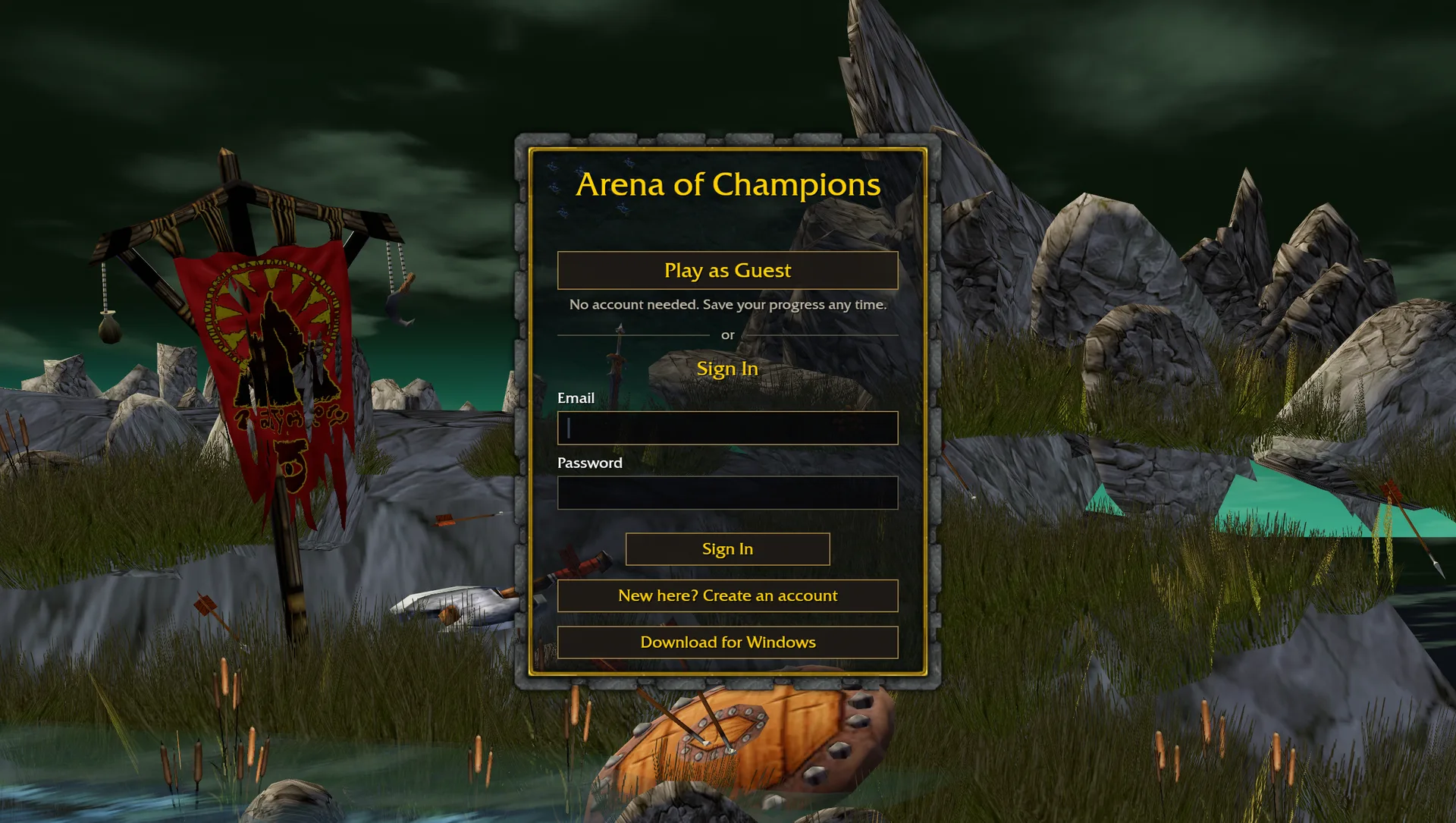
Guest access, sign-in and the Windows download are grouped in the centre. Open the game site to use them.
Our capture · 3 Nov 2026 · Entry screen only; successful sign-in and gameplay not verified.Find your starting point
Arena of Champions
classes & roles.
Stay close
Try melee if you enjoy tracking a moving opponent. Your first exercise is staying in reach without losing sight of your team.
Create space
Try ranged damage if you enjoy choosing where to fight. Practice finding an angle to act, then moving before pressure reaches you.
Support a partner
Try healing if you enjoy watching the whole fight. Practice switching between yourself and an ally while keeping both opponents in view.
Compare classes & specializations 9 classes
Community snapshot v0.23 · 1 Nov 2026 ↗. This is a starting-point reference, not a strength ranking. Check the current game roster before choosing.
Warrior
Arms · Fury
Melee damageMage
Fire · Frost
Ranged damagePriest
Discipline · Shadow
Healing · Ranged damageRogue
Assassination · Subtlety
Melee damageHunter
Marksmanship · Beast Mastery
Ranged damagePaladin
Holy · Retribution
Healing · Melee damageWarlock
Affliction · Demonology · Destruction
Ranged damageDruid
Restoration · Feral · Balance
Healing · Melee / ranged damageShaman
Restoration · Enhancement · Elemental
Healing · Melee / ranged damage
The first-session guide
Get your bearings.
Then enter the arena.
On the original game site, start with the entry screen, check your bindings and learn one class. Keep this guide open in a separate tab as a reference.
Open Arena of Champions
Follow the play link to arenaofchampions.live. On its entry screen, choose Play as Guest or sign in with an existing game account. Accounts and progress are managed there.
Set up your controls
Click inside the game, then check Settings → Key Bindings. Start with movement, targeting and a few action-bar keys you can comfortably reach.
Learn one class first
Read your current abilities and look for practice before joining a queue. Identify a damage or healing spell, a defensive, and an interrupt or control ability.
A separate game with its own accounts, talents and progression. WoW Forever builds cannot be imported.
Keep this handy
Arena of Champions
controls.
Move
W A S DSpaceMove in four directions; jump with Space.
Camera
Left dragRight dragWheelLook around, turn your character, and zoom.
Target
TabF1 / F2 / F3Select an enemy, yourself, or a teammate.
Cast
1–8T / GUse action-bar slots and the two utility keys.
Focus
FShift + FSet a focus target, then select that focus.
Talents & chat
NEnterOpen Spells & Talents, or type in chat.
Defaults from community guides. Your in-game Settings → Key Bindings takes priority.
Build a usable loadout
Before the gates open.
A short setup routine to try in practice. These are learning suggestions, not a tested build or a fixed rotation.
Read the kit you actually have
Open Spells & Talents with N. Identify your main damage or healing action, one defensive, and any interrupt or control. Read their current conditions; familiar WoW names can behave differently here.
Give each button a job
Put frequent actions on comfortable keys and keep the emergency defensive easy to find. Test targeting an enemy, yourself and a teammate before changing several bindings at once.
Choose utilities around a problem
Review the two utility slots. Decide whether you need help with control, movement, health or mana, then check each choice’s restrictions in the current tooltip.
Agree on one team plan
For a team session, name a pressure target and decide who responds first to an enemy cast. Call your defensive use so your partner can decide whether another response is needed.
Which utilities solve which problems? 5 options
Names and restrictions from the community v0.23 reference ↗. Check current tooltips for values and availability; no universal pair is recommended.
- Gladiator’s Medallion
- Escape eligible crowd control. Read the listed control types; do not assume it removes every effect.
- Bandage
- Recover health through a channel. Movement or damage interrupts the channel; look for a safe window.
- Infuse
- Recover mana outside combat. The reference limits it to one use per match; it needs an out-of-combat window.
- Hustle
- Gain a short movement-speed boost. Choose a destination before using it; speed alone does not solve a blocked route.
- Healing Tonic
- Recover health immediately. The reference limits it to one use per match; plan when that recovery would help.
Find the practice menu
Arena of Champions practice.
One thing to improve.
Learn the route into practice, then use a repeatable matchup to work through the goals below.
- 01 / FindPractice Master
In town, look beside the eastern tent for Bromli Thunderkeg, the Practice Master. Right-click to open the menu.
- 02 / ChooseSet the matchup
Choose a 1v1, 2v2 or 3v3 practice bracket, select an opponent class, then choose Start Practice.
- 03 / LearnBegin with 1v1
For a first exercise, choose 1v1 and keep the same opponent while learning your buttons. Add partner coordination in a later team session.
Illustration, not a screenshot or town map. The community guide shows the practice menu in a v0.21 capture. We have not retested this route in the current game; follow the current menus if they differ. See the reference ↗
Your first-session goals
- Keep one target selected while moving and turning the camera.
- Try one damage or healing ability, then check its cooldown.
- Find your defensive button before you need it.
- Practice an interrupt or control ability against an opponent cast.
- Use a pillar or corner to learn how line of sight affects your target.
Turn a mistake into a plan
What to watch
during a match.
Editorial scenarios to test in practice. They do not establish a winning composition, control chain or matchup advantage.
Before chasing around cover, check where your healer is. Use practice to learn when a pillar breaks your line of sight and how to reconnect.
Concept only · Not a game map or a measured range. Positioning depends on the situation.You chase an opponent behind a pillar
- Check
- Can your healer still see you, and can your partner follow?
- Try next
- Pause at the corner and reassess. Move together or switch pressure to a reachable target instead of stretching the team across cover.
- Practice goal
- Circle cover with a partner and call out the moment support is lost.
You lose health before using a defensive
- Check
- Were you watching your health, enemy pressure, or only your damage buttons?
- Try next
- Choose a warning sign before the next attempt. Put your defensive on a reachable key and communicate when you use it; avoid spending every response at once.
- Practice goal
- Repeat the same matchup while focusing on one defensive decision.
Two teammates interrupt the same cast
- Check
- Was a first response assigned, and did anyone call it?
- Try next
- Assign a first interrupt and a backup. Read the current spell rules before planning a control sequence; different effects may overlap or have restrictions.
- Practice goal
- Use a short call such as “mine” before committing your response.
You deal damage but cannot finish a target
- Check
- Were both players pressuring the same target, or acting in separate windows?
- Try next
- Pick one target and wait until your partner can contribute before committing an offensive window. Review one failed attempt before changing your whole build.
- Practice goal
- After the match, identify one missed opportunity and change only that next time.
A little help
Before your first session.
Guest access, game settings and connection problems, explained.
Visit the game site ↗What is Arena of Champions?
Arena of Champions is a separate, Warcraft-inspired arena PvP game hosted at arenaofchampions.live. This page provides a link to the original game, a control reference and a beginner checklist. WoW Forever Talent is an independent guide site.
Does Arena of Champions need an account or download?
The game offers Play as Guest, account sign-in and account creation on its entry screen, alongside a Windows download. The browser option runs on the game’s own site without installing the Windows app. Use the game’s own save and account options for progress you want to keep; do not rely on a guest session as a permanent backup.
Where can I play Arena of Champions, and what if it will not load?
Use Play on the game site to open arenaofchampions.live in a new tab. This guide does not embed or host the game. If the original site shows a browser verification screen, follow its instructions. For a blank game screen, try a current desktop browser with graphics acceleration enabled. Service errors need to be resolved by the game operator.
What does “Something went wrong on the server” mean?
The game service could not complete your request. We encountered this message when testing guest access on 3 November 2026. Try again later or check the original game site. Repeatedly reloading the game will not fix a server error.
Why are my keys or sound not working?
Click inside the game to give it keyboard focus and allow audio after a user gesture. Check the game’s Key Bindings and your browser’s sound settings. On a laptop, function keys may also need the Fn key. Saved bindings can differ from the reference above.
Can I play Arena of Champions on a phone?
This guide works on a phone. Full touch controls in the game are not verified, so a desktop with a keyboard and mouse is recommended for playing. Opening the game site on a phone does not guarantee that every action can be performed by touch.
Can I import a WoW Forever talent build?
WoW Forever builds are not imported into Arena of Champions. These are separate games with their own class rules and progression. Use the game’s own Spells & Talents menu to set up your character.
Take the next step
Put one thing into practice.
Keep this guide handy while you explore Arena of Champions on its own site.
Sources & game information Checked
The game runs from its operator’s site; accounts and saves are managed there. This independent page does not host game files.
- Arena of Champions game site ↗
Game, accounts and downloads. Guest access returned a server error during our 3 November check.
- Controls walkthrough ↗
Movement, camera and action-bar reference.
- Keybindings reference ↗
Targeting, talents and customizable bindings.
- Community beginner guide ↗
Guide snapshot v0.23; practice menu captured in v0.21. Current menus take priority.
- Classes and specializations ↗
Community v0.23 snapshot, 1 Nov 2026. Role advice is editorial, not a difficulty or power ranking.
- Utility reference ↗
Community v0.23 snapshot. Current tooltip restrictions take priority; no exact values copied here.
- Team preparation reference ↗
Community v0.21 reference. Tactical prompts are planning advice, without win-rate or tested-combo claims.